Explore free templates for documents, visuals, presentations, social media, and more. Pick a format, make your tweaks, and get to the good part: the finished product.
How to customize QuillBot's templates

Choose your template: Pick the format that matches your goal. Whether you're drafting a document, designing a graphic, or building a presentation, choosing the right template gives you the structure to start.

Customize it: Swap in your content, adjust the layout, and tweak the text, and update your visuals. Templates are flexible by design, so you can adapt them to your voice, brand, or style.

Finish your draft: Refine your content until it’s perfect, then download and share. This is where you turn something “good enough” into something you’d actually send, present, or post.

Review and download: Finalize your design, then download or share it in the format that best suits your needs.
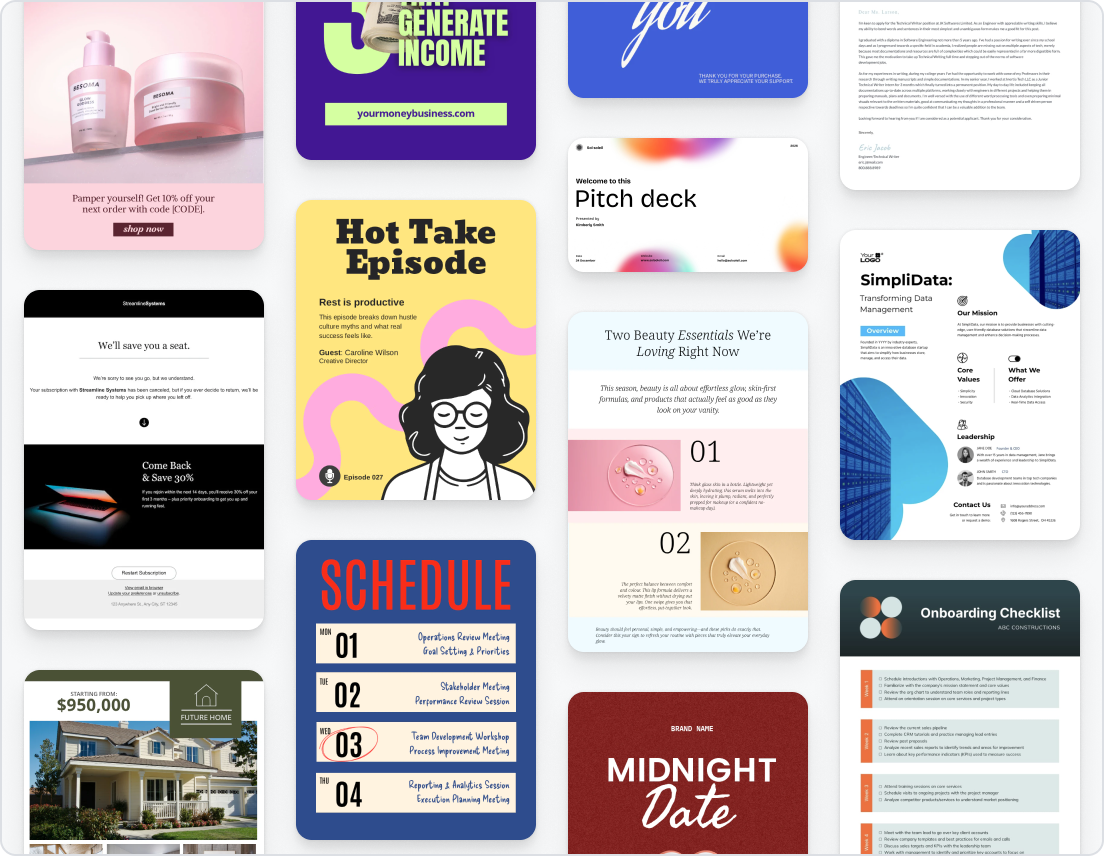
How to select the right template design online
Choose a template that aligns with your purpose, audience, and content type.

Define your goal before you start
Specify what you want to create and why. Whether you’re designing a resume to get hired, creating a social post to share info, or drafting a presentation to impress your boss, choosing the right template is crucial. Get your message from the start instead of forcing reworks later on.

Consider your content type and platform
Different platforms need different formats. A document template handles detail. A social template grabs attention. Choose based on where your content will live, not just what looks nice.

Match the tone to your audience
A pitch deck and an Instagram post shouldn’t sound the same. Pick a template that aligns with your audience’s expectations, whether that’s polished, playful, or somewhere in between.

Use a clean and logical structure
Guide your audience without making them think about it. Use a template with a flow that makes sense for your project. If you have to fight the structure, it’s the wrong template.

Maintain visual and brand consistency
Consistency builds reputation (and saves you from last-minute fixes). Choose templates that align with your brand’s vibe so everything feels cohesive across formats.

Simplicity over complexity
When in doubt, keep it simple. Basic templates are easier to customize and harder to mess up. Don’t get overwhelmed with complicated assets when you don’t need to.
Why choose QuillBot’s free template?
Easy customization for any purpose
Edit text, visuals, and layouts without friction.
Professional high-quality template
Start from something that already looks good so your project is sharp from the beginning.
Designed for real-world use cases
Use templates built for actual work, whether it’s an assignment, a presentation, a campaign, or a social media post.
Perfect for both beginners and professionals
Don’t stress over figuring out a new process.
No design experience needed
Use our proven templates and skip the stress of figuring it all out on your own.
Who should use the template?

Agencies and marketers
Design pitches, ad banners, and social media posts
Students and educators
Create worksheets, slides, pamphlets, and posters
Influencers and creators
Make social media graphics, video title cards, and pitches
When should you choose a template?
Want to get started instantly
Templates remove the hardest part—the blank page. Start with structure and momentum instead.
Want a polished, professional look
A template gets you 90% of the way there before you begin. The rest is just making it yours.
Need consistency across formats
Templates keep your work aligned so your branding stays similar between assets.
Create reusable or repeat content
Templates prevent decision fatigue by offering a simple starting point.
Templates related FAQ’s
What is a template and how does it work?
A template is a pre-made layout that you can use to start making content. You don't have to start from scratch; instead, you start with a structured format that includes sections, typography, and design elements. Then you can add your own text, images, or data to make it your own. The goal of using a document template, presentation template, or social media template is the same: save time, stay consistent, and make something that looks good without overthinking every design choice.
Are QuillBot templates free to use?
Yes. You can use QuillBot's many free templates for documents, presentations, pictures, and social media posts. You can look through, change, and download templates for free, which makes it easy to start projects without having to buy any extra tools or pay for anything. You can use free templates for personal, academic, or professional purposes without any restrictions.
Can I customize fonts, colors, and layouts in QuillBot templates?
Yes. You can change the fonts, colors, layouts, and content of QuillBot templates to fit your needs. You can control how your final design turns out, whether you're following brand guidelines or just trying to make something look less generic. This flexibility makes it simple to customize a basic template without starting from scratch.
Do I need design experience to use these templates?
No. QuillBot templates are easy for beginners to use because they have clear layouts and structures that make sense. You don't need to have designed anything before to make something that looks professional. Templates take care of the hard work of spacing, aligning, and structuring your content so you can focus on writing instead of figuring out design rules on the fly.
Are QuillBot templates beginner-friendly?
Yes. You can change the fonts, colors, layouts, and content of QuillBot templates to fit your needs. You can control how your final design turns out, whether you're following brand guidelines or just trying to make something look less generic. This flexibility makes it simple to customize a basic template without starting from scratch.
Will the downloaded file retain its quality and formatting?
Yes. When you download a template, it retains its layout, formatting, and visual quality. This means your document, presentation, or design will look the same outside the editor as it did while you were working. This is especially helpful for sharing, printing, or showing off your work without having to worry about things moving or breaking at the last minute.
Are QuillBot templates good for both students and professionals?
Yes. You can use QuillBot templates for a lot of different things, like schoolwork, business documents, and professional presentations. Students can use template projects, and professionals can make reports, decks, and marketing materials that are easy to read, consistent, and ready to share.
Can I use these templates for business or commercial purposes?
Yes. You can use QuillBot templates for business and professional work, like marketing materials, client presentations, and internal documents. They're made to be used in the real world, so you can use templates to quickly make polished, client-ready content whether you're working alone or with a team.
Is it possible to download the template without a watermark?
Yes. Templates can be downloaded clean, without watermarks.
Can I edit the templates on Mac and Windows?
Yes. QuillBot templates work across devices, including Mac and Windows.
What types of templates does QuillBot offer?
QuillBot offers templates for documents, visuals, presentations, and social media content, and more.
Can I save and download my template file?
Yes. You can save and download your templates in formats like PDF, JPG, PNG, and more.